If You’re Using Outlook:
First
- Log into your webmail on a web browser
- Right-click on Trash & click Purge “Trash”
- Click on the dropdown menu next to your email address & click Settings
- Click on General Settings > Email Options
- Under Trash Options, uncheck both settings
- Go into all of your folders & delete everything you can

Second
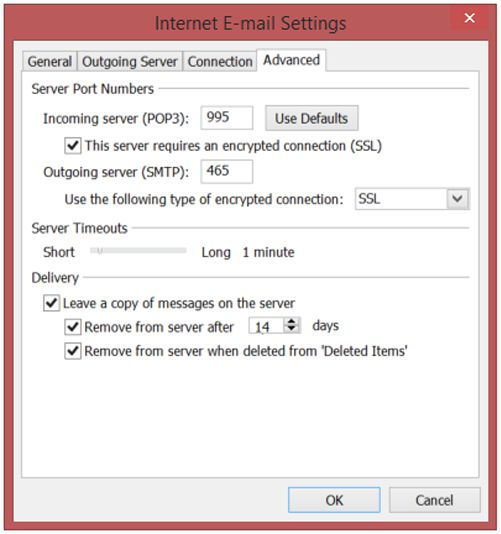
- Open Outlook, click the TOOLS menu, and select EMAIL ACCOUNTS
- Select VIEW OR CHANGE EXISTING EMAIL ACCOUNTS and click Next. Now double click on the account you want to change
- Click MORE SETTINGS > ADVANCED
- Under DELIVERY, uncheck LEAVE A COPY OF MESSAGES ON THE SERVER
- Lower the number of days that messages stay on the server
- Click OK
If You’re Not Using Outlook:
- Log into your webmail on a web browser
- Right-click on Trash & click Purge “Trash”
- Click on the dropdown menu next to your email address & click Settings
- Click on General Settings > Email Options
- Under Trash Options, uncheck both settings
- Go into all of your folders & delete everything you can